
How MCP Works
A technical overview of how FHIRfly connects to AI assistants via the Model Context Protocol.
Architecture
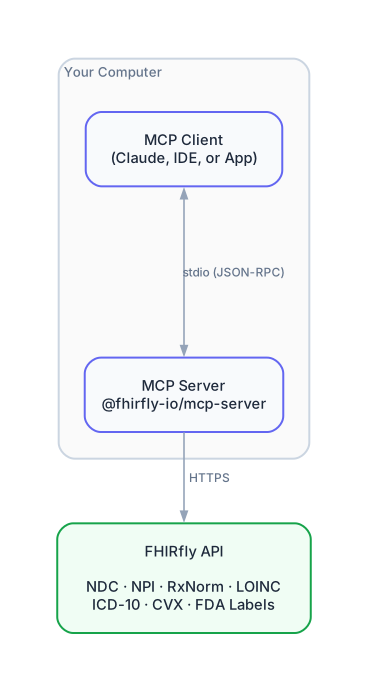
Components
MCP Client
Any application that implements the MCP specification can connect to FHIRfly. This includes AI assistants (Claude, ChatGPT with plugins), IDEs (VS Code, Cursor), and custom applications. When you ask healthcare questions, the client can call MCP tools to get real-time data.
MCP Server (npm package)
The @fhirfly-io/mcp-server package runs as a local process on your machine. It:
- Receives tool requests from Claude via stdin (JSON-RPC)
- Makes authenticated API calls to FHIRfly
- Returns structured data to Claude via stdout
The server is stateless and only runs when the MCP client needs healthcare data.
FHIRfly API
The cloud API that serves healthcare reference data. It handles:
- NDC drug lookups and searches
- NPI provider lookups and searches
- RxNorm, LOINC, ICD-10, CVX, MVX data
- FDA drug label information
- SNOMED CT clinical concepts (IPS free set)
- Healthcare provider connectivity (FHIR endpoints)
- Claims intelligence (NCCI, MUE, PFS, Coverage)
Communication Protocol
MCP uses JSON-RPC 2.0 over stdio (standard input/output).
Example: Tool Discovery
The client requests the list of available tools:
{"jsonrpc":"2.0","id":1,"method":"tools/list"}
The server responds with available tools:
{
  "jsonrpc": "2.0",
  "id": 1,
  "result": {
    "tools": [
      {
        "name": "ndc_get",
        "description": "Look up a drug by NDC code",
        "inputSchema": {
          "type": "object",
          "properties": {
            "code": {"type": "string", "description": "NDC code"}
          },
          "required": ["code"]
        }
      }
    ]
  }
}
Example: Tool Call
The client calls a tool with parameters:
{
  "jsonrpc": "2.0",
  "id": 2,
  "method": "tools/call",
  "params": {
    "name": "ndc_get",
    "arguments": {"code": "0069-0151-01"}
  }
}
The server calls FHIRfly's API and returns the result:
{
  "jsonrpc": "2.0",
  "id": 2,
  "result": {
    "content": [
      {
        "type": "text",
        "text": "{\"ndc\":\"0069-0151-01\",\"brand_name\":\"Lipitor\",\"generic_name\":\"Atorvastatin Calcium\",\"labeler\":\"Pfizer\",\"meta\":{\"source\":\"FDA NDC Directory\"}}"
      }
    ]
  }
}
Security Model
Local Execution
The MCP server runs entirely on your computer. Your API key never leaves your machine except when making API calls to FHIRfly.
API Key Scoping
FHIRfly API keys can be scoped to limit access:
- Read-only scopes: Most MCP operations only need read access
- Dataset scopes: Limit to specific data types (NDC, NPI, etc.)
- Rate limiting: Each key has its own quota
No Data Storage
The MCP server is stateless. It doesn't cache or store any data locally beyond the current request/response cycle.
Alternative: Direct HTTP Mode
MCP also supports connecting over HTTP with Server-Sent Events (SSE). FHIRfly provides a hosted endpoint for this:
https://api.fhirfly.io/mcp
In this mode:
- The client connects directly to FHIRfly (no local process)
- Responses stream via SSE
- Your API key is sent as a header
This is useful for clients that can't run local processes, or when building custom integrations.
See the HTTP API Reference for detailed endpoint documentation.
Source Code
The MCP server is open source:
- npm: @fhirfly-io/mcp-server
- GitHub: FHIRfly-io/fhirfly-mcp-server
Learn More
- Model Context Protocol Specification
- MCP HTTP API Reference - Build custom MCP clients
- Claude Desktop Setup - Quick setup for Claude users
- FHIRfly API Reference - Full REST API documentation